Level 1 Adventurer: Build Your First .NET 10 Console App
Skip Hello World: build a turn-based goblin fight as your first .NET 10 console app, learning the CLI, console input, arguments and NuGet packages one level at a time.
Hello World proves our setup works and teaches us nothing else. So let’s skip it and build a small fight against a goblin instead, picking up the .NET basics we’ll actually reuse along the way.
I used to reach for Python for small console tools. I assumed C# would need too much boilerplate to do simple things. That turned out to be wrong once I built a .NET console app for a slow file-system check. What kept slowing me down in Python was dependencies: install a library into the main environment and sooner or later it clashes with another library’s versions. Setting up and managing a venv every time defeats the point of a quick tool. Now I type dotnet new console and I know everything will work. I’m also a strong-typing fan: I can hover over a variable and know what it is, and the compiler catches my mistakes while I write, which made me faster, not slower.
What we’ll need
We’ll build a turn-based fight against a goblin, an orc or a dragon, and level up as we go. Each level-up adds one thing: a project, console input, dice and a game loop, command-line arguments, and finally NuGet packages. At level 5, a round looks like this:
──────────────────────────────────────────────────────────────── Round 4 ─────────────────────────────────────────────────────────────────
  Hero  ███████████████████████████████████████ 19
goblin  █████████ 5
You roll 16 and hit the goblin for 4 damage.
The goblin rolls 17 and hits you for 2 damage.- .NET: the .NET 10 SDK (this article uses 10.0.113). Get it from the official download page, then check with
dotnet --version. - Packages: System.CommandLine 2.0.14 and Spectre.Console 0.57.2, added in Level 5.
- A terminal and any text editor or IDE.
- Some programming experience in another language. No C# needed.
Level 1: Create the project
Every adventurer starts as a blank character sheet. In .NET, that sheet is a project.
Let’s make a folder for it and let the .NET CLI generate the project inside:
mkdir level-1-dotnet-console-app
cd level-1-dotnet-console-app
dotnet new console
The template "Console App" was created successfully.
Processing post-creation actions...
Restoring ~/level-1-dotnet-console-app/level-1-dotnet-console-app.csproj:
Restore succeeded.dotnet new console creates a project from the built-in “Console App” template and names it after the folder. Then it runs a restore, which fetches the NuGet packages the project depends on. A fresh console app has none, so there is nothing to fetch yet.
We now have three things:
.
├── Program.cs
├── level-1-dotnet-console-app.csproj
└── obj/
Program.cs
// See https://aka.ms/new-console-template for more information
Console.WriteLine("Hello, World!");
That’s the whole program. No class, no Main method. This style is called top-level statements: the compiler generates the Main method for us, and our code runs from top to bottom. For anyone coming from Python or JavaScript, this is the second-closest thing .NET has to a script. The closest is new in .NET 10: file-based apps run a single .cs file with dotnet run app.cs, no project at all. We’ll stick with a project, because that’s what we’ll meet in real codebases.
The .csproj
<Project Sdk="Microsoft.NET.Sdk">

  <PropertyGroup>
    <OutputType>Exe</OutputType>
    <TargetFramework>net10.0</TargetFramework>
    <RootNamespace>level_1_dotnet_console_app</RootNamespace>
    <ImplicitUsings>enable</ImplicitUsings>
    <Nullable>enable</Nullable>
  </PropertyGroup>

</Project>
The project file plays the role of package.json or pyproject.toml: it tells the build what to produce and how.
OutputTypeisExe: build a program we can run, not a library.TargetFrameworkisnet10.0: the .NET version the app targets.RootNamespace: the default namespace, taken from the project name. Hyphens aren’t allowed in C# names, so they became underscores.ImplicitUsings: the SDK adds commonusingdirectives for us, such asSystem. That’s whyConsoleworks withoutusing System;at the top. After a build we can see the full list inobj/Debug/net10.0/level-1-dotnet-console-app.GlobalUsings.g.cs.Nullable: turns on nullable reference types, so the compiler warns us when a value might benull.
obj/
The restore created this folder. It holds intermediate files for the build. We don’t edit it, and we don’t commit it.
Keep build output out of git
dotnet new gitignoreThe template "dotnet gitignore file" was created successfully.This adds a .gitignore that already covers bin/, obj/ and the folders IDEs create, such as Rider’s .idea/. Let’s add it before our first commit, so build output never sneaks in.
Run it
dotnet runHello, World!dotnet run builds the project, then runs it. The build output lands in a new bin/ folder. By default it’s a Debug build, so look in bin/Debug/net10.0/. We’ll find an executable there named after the project.
Level 2: Talk to the player
Hello World only talks. A game also has to listen. Let’s level up by teaching our program to listen: a single round against a goblin, where it describes the scene, asks what we do, and reacts.
Let’s add some functionality to our Program.cs:
The stats
int heroHp = 20;
int goblinHp = 10;
int heroDamage = 4;
int goblinDamage = 3;
int holds whole numbers. C# is strongly typed: every variable has a type, and it can’t change later.
Set the scene
Console.WriteLine("A goblin jumps out of the bushes!");
Console.WriteLine($"Hero HP: {heroHp} | Goblin HP: {goblinHp}");
Console.Write("What do you do? (attack/defend): ");$"..."is string interpolation.{heroHp}drops the value into the text, like a template literal in JavaScript or an f-string in Python.Console.Writedoesn’t end the line, so the player’s answer appears right after the prompt.Console.WriteLinedoes.
Read the answer
string? input = Console.ReadLine();
string action = (input ?? "").Trim().ToLower();Console.ReadLine()returnsstring?, notstring. The?means the value can benull, which happens when there is no more input, for example when the player presses Ctrl+D in a Linux or macOS terminal, or Ctrl+Z followed by Enter on Windows. Because the project hasNullableenabled, the compiler makes us deal with that.input ?? ""means “useinput, or an empty string if it’snull”. After that,Trim()removes spaces around the text andToLower()makesDEFENDmatchdefend.
React to the move
if (action == "attack")
{
    goblinHp -= heroDamage;
    Console.WriteLine($"You hit the goblin for {heroDamage} damage.");
}
else if (action == "defend")
{
    goblinDamage /= 2;
    Console.WriteLine("You raise your shield.");
}
else
{
    Console.WriteLine("You hesitate. The goblin doesn't.");
}-=is shorthand forgoblinHp = goblinHp - heroDamage.goblinDamage /= 2divides twoints, andintdivision drops the remainder. That’s why defending turns 3 damage into 1, not 1.5.- The final
elsecatches everything that isn’t a known move, including an empty line. We lose our turn, but the goblin still attacks.
The goblin strikes back
heroHp -= goblinDamage;
Console.WriteLine($"The goblin hits you for {goblinDamage} damage.");
Console.WriteLine($"Hero HP: {heroHp} | Goblin HP: {goblinHp}");
Whatever we chose, the goblin attacks, and the round ends with both HP values.
Run it
Let’s start with an attack:
dotnet runA goblin jumps out of the bushes!
Hero HP: 20 | Goblin HP: 10
What do you do? (attack/defend): attack
You hit the goblin for 4 damage.
The goblin hits you for 3 damage.
Hero HP: 17 | Goblin HP: 6Again, and this time we defend, in capitals:
A goblin jumps out of the bushes!
Hero HP: 20 | Goblin HP: 10
What do you do? (attack/defend): DEFEND
You raise your shield.
The goblin hits you for 1 damage.
Hero HP: 19 | Goblin HP: 10
And once more, pressing Enter without typing anything:
A goblin jumps out of the bushes!
Hero HP: 20 | Goblin HP: 10
What do you do? (attack/defend):
You hesitate. The goblin doesn't.
The goblin hits you for 3 damage.
Hero HP: 17 | Goblin HP: 10
Code at this point: level-2
Level 3: Roll the dice
One fixed round isn’t a fight, and certainly not enough to reach level 3. Let’s level up by adding dice, a fight that keeps going until someone drops, and a record of what happened.
The rules are a very light take on tabletop RPGs:
- Each round we choose to attack, defend or flee. Then the goblin attacks.
- To hit, roll a d20 (a 20-sided die). If the roll is at least the target’s armor, it’s a hit, and the attacker rolls a damage die: a d6 for us, a d4 for the goblin.
- Defend: we don’t attack, and the goblin’s damage is halved.
- Flee: roll a d20. On 10 or more we escape.
We build the new Program.cs from top to bottom: each piece below goes right after the previous one. The full file is in the repo: level-3.
Set up the fight
Random random = new Random();

int heroHp = 20;
int heroArmor = 12;
int heroDie = 6;

int goblinHp = 10;
int goblinArmor = 10;
int goblinDie = 4;

List<string> log = [];
int round = 0;
bool fled = false;
Stats for both sides, a random number generator, and some bookkeeping:
List<string> log = [];creates an empty list of strings.[]is a collection expression, and it looks like the arrays and lists we know from JavaScript and Python.boolholdstrueorfalse.
A function for dice
int Roll(int sides)
{
    return random.Next(1, sides + 1);
}
random.Next(1, sides + 1)returns a number from 1 up to, but not including,sides + 1. SoRoll(20)gives 1 to 20.Rollis a local function, declared right among our top-level statements. It can userandombecause both live in the same scope.
The round loop
Console.WriteLine("A goblin jumps out of the bushes!");

while (heroHp > 0 && goblinHp > 0)
{
    round++;
    Console.WriteLine();
    Console.WriteLine($"Round {round} | Hero HP: {heroHp} | Goblin HP: {goblinHp}");
    Console.Write("What do you do? (attack/defend/flee): ");

    string? input = Console.ReadLine();
    string action = (input ?? "").Trim().ToLower();
    bool defending = false;
while (heroHp > 0 && goblinHp > 0)repeats the round as long as we and the goblin are both standing.round++adds one toround.- Reading the input works exactly like Level 2.
defendingis declared inside the loop, so it starts asfalseevery round.
Our move
    if (action == "attack")
    {
        int toHit = Roll(20);
        if (toHit >= goblinArmor)
        {
            int damage = Roll(heroDie);
            goblinHp -= damage;
            Console.WriteLine($"You roll {toHit} and hit the goblin for {damage} damage.");
            log.Add($"Round {round}: You hit for {damage}");
        }
        else
        {
            Console.WriteLine($"You roll {toHit} and miss.");
            log.Add($"Round {round}: You missed");
        }
    }
    else if (action == "defend")
    {
        defending = true;
        Console.WriteLine("You raise your shield.");
        log.Add($"Round {round}: You defended");
    }
    else if (action == "flee")
    {
        int escapeRoll = Roll(20);
        if (escapeRoll >= 10)
        {
            fled = true;
            Console.WriteLine($"You roll {escapeRoll} and escape!");
            log.Add($"Round {round}: You fled");
            break;
        }

        Console.WriteLine($"You roll {escapeRoll}. The goblin blocks your way.");
        log.Add($"Round {round}: You failed to flee");
    }
    else
    {
        Console.WriteLine("You hesitate. The goblin doesn't.");
        log.Add($"Round {round}: You hesitated");
}- Attack and flee both roll a d20 with
Roll(20). On a hit,Roll(heroDie)decides the damage. log.Add(...)appends an entry to the combat log, and the list grows as needed.breakleaves the loop early. Here it ends the fight when we escape.
The goblin’s move
    if (goblinHp <= 0)
    {
        break;
    }

    int goblinToHit = Roll(20);
    if (goblinToHit >= heroArmor)
    {
        int goblinDamage = Roll(goblinDie);
        if (defending)
        {
            goblinDamage /= 2;
        }

        heroHp -= goblinDamage;
        Console.WriteLine($"The goblin rolls {goblinToHit} and hits you for {goblinDamage} damage.");
        log.Add($"Round {round}: goblin hit for {goblinDamage}");
    }
    else
    {
        Console.WriteLine($"The goblin rolls {goblinToHit} and misses.");
        log.Add($"Round {round}: goblin missed");
    }
}- This
breakends the fight when the goblin drops, so a dead goblin doesn’t get to hit back. - Defending halves the damage with
goblinDamage /= 2. More on that below.
The ending
if (fled)
{
    Console.WriteLine("You live to fight another day.");
}
else if (heroHp <= 0)
{
    Console.WriteLine("You have been defeated.");
}
else
{
    Console.WriteLine("The goblin is defeated!");
}

Console.WriteLine();
Console.WriteLine("Combat log:");
foreach (var entry in log)
{
    Console.WriteLine(entry);
}- The ending checks
fledfirst, then the hero’s HP. If neither applies, the goblin is the one who dropped. foreach (var entry in log)runs once for every entry.vartells the compiler to work out the type itself.entryis still astring; we just don’t have to write it.
Run it
dotnet runThe dice are random, so your fight will play out differently. Here’s one of mine:
A goblin jumps out of the bushes!

Round 1 | Hero HP: 20 | Goblin HP: 10
What do you do? (attack/defend/flee): attack
You roll 1 and miss.
The goblin rolls 11 and misses.

Round 2 | Hero HP: 20 | Goblin HP: 10
What do you do? (attack/defend/flee): attack
You roll 5 and miss.
The goblin rolls 14 and hits you for 3 damage.

Round 3 | Hero HP: 17 | Goblin HP: 10
What do you do? (attack/defend/flee): attack
You roll 16 and hit the goblin for 3 damage.
The goblin rolls 13 and hits you for 3 damage.

Round 4 | Hero HP: 14 | Goblin HP: 7
What do you do? (attack/defend/flee): attack
You roll 10 and hit the goblin for 3 damage.
The goblin rolls 6 and misses.

Round 5 | Hero HP: 14 | Goblin HP: 4
What do you do? (attack/defend/flee): defend
You raise your shield.
The goblin rolls 13 and hits you for 1 damage.

Round 6 | Hero HP: 13 | Goblin HP: 4
What do you do? (attack/defend/flee): attack
You roll 19 and hit the goblin for 1 damage.
The goblin rolls 6 and misses.

Round 7 | Hero HP: 13 | Goblin HP: 3
What do you do? (attack/defend/flee): attack
You roll 10 and hit the goblin for 3 damage.
The goblin is defeated!

Combat log:
Round 1: You missed
Round 1: goblin missed
Round 2: You missed
Round 2: goblin hit for 3
Round 3: You hit for 3
Round 3: goblin hit for 3
Round 4: You hit for 3
Round 4: goblin missed
Round 5: You defended
Round 5: goblin hit for 1
Round 6: You hit for 1
Round 6: goblin missed
Round 7: You hit for 3
The zero-damage hit
Defending halves the goblin’s damage with goblinDamage /= 2. Both sides of that division are ints, and in C# dividing an int by an int gives an int. The fractional part is dropped:
| Goblin’s d4 roll | Damage after /= 2 |
|---|---|
| 1 | 0 |
| 2 | 1 |
| 3 | 1 |
| 4 | 2 |
So if we defend and the goblin rolls a 1, we’ll see “hits you for 0 damage”. Call it a perfect block. That’s not a bug, though. It’s int division doing exactly what it says. If we wanted the half, we’d need a type with decimals, such as double: 1 / 2.0 is 0.5. HP in whole numbers is the point of this game, so the zero stays.
Code at this point: level-3
Level 4: Arguments
Typing “attack” every round is the game. Editing code to pick a different enemy is not. Let’s level up by reading options from the command line: --hero, --enemy, --seed, and -h/--help. Along the way, we meet the orc and the dragon.
Most of Level 3 stays. The new parts are at the top and the bottom of the file, and goblin becomes enemy everywhere in between. The full file is in the repo: level-4.
Read the options
New, at the very top of the file:
string heroName = "Hero";
string enemyName = "goblin";
int seed = Random.Shared.Next();

for (int i = 0; i < args.Length; i++)
{
    string arg = args[i];
    bool hasValue = i + 1 < args.Length;

    if (arg == "-h" || arg == "--help")
    {
        Console.WriteLine("""
            Usage: dotnet run -- [options]

            Options:
                --hero <name>       Your hero's name (default: Hero)
                --enemy <name>     goblin, orc or dragon (default: goblin)
                --seed <number>     Replay a fight with the same dice rolls
                -h, --help          Show this help
            """);
        return 0;
    }
    else if (arg == "--hero" && hasValue)
    {
        heroName = args[i + 1];
        i++;
    }
    else if (arg == "--enemy" && hasValue)
    {
        enemyName =  args[i + 1].ToLower();
        i++;
    }
    else if (arg == "--seed" && hasValue)
    {
        if (!int.TryParse(args[i + 1], out seed))
        {
            Console.WriteLine($"--seed needs a whole number, not '{args[i + 1]}'.");
            return 1;
        }
        i++;
    }
    else
    {
        Console.WriteLine($"Unknown or incomplete option: {arg}");
        Console.WriteLine("Run with --help to see the options.");
        return 1;
    }
}argsholds the command-line arguments as astring[], an array of strings. With top-level statements it’s already there, no declaration needed.- The
forloop walks throughargs. When an option takes a value, the code readsargs[i + 1]and doesi++to skip over it.hasValuemakes sure there is a next item, so--heroat the very end doesn’t crash. """starts a raw string literal: the text prints exactly as written, line breaks included. The closing"""sets the left margin. Its indentation is removed from every line.int.TryParse(text, out seed)tries to turn text into anint. It returnsfalseinstead of throwing an exception, and on success it writes the number intoseed.return 0;andreturn 1;end the program and set its exit code: 0 for success, anything else for an error. Scripts and CI read that code.Random.Shared.Next()picks a random seed, in case we don’t pass one.
Pick the enemy
int enemyHp;
int enemyArmor;
int enemyDie;
string intro;

switch (enemyName)
{
    case "goblin":
        enemyHp = 10;
        enemyArmor = 10;
        enemyDie = 4;
        intro = "A goblin jumps out of the bushes!";
        break;
    case "orc":
        enemyHp = 16;
        enemyArmor = 12;
        enemyDie = 6;
        intro = "An orc blocks the road!";
        break;
    case "dragon":
        enemyHp = 40;
        enemyArmor = 16;
        enemyDie = 10;
        intro = "A dragon lands in front of you. This might be a mistake.";
        break;
    default:
        Console.WriteLine($"Unknown enemy: {enemyName}. Choose goblin, orc or dragon.");
        return 1;
}
switch (enemyName)picks the stats.defaultcatches every name it doesn’t know.- Choose wisely: the dragon has 40 HP, and we need a 16 or better to hit it.
Seed the dice
The stats and the Roll function stay as they were. The random number generator now takes the seed:
Random random = new Random(seed);new Random(seed) makes every roll follow from the seed.
The fight, with names
The loop is Level 3’s, with the goblin’s variables renamed to enemyHp, enemyArmor, enemyDie, enemyToHit and enemyDamage, and the names in the messages. For example, the intro and the status line:
Console.WriteLine(intro);

while (heroHp > 0 && enemyHp > 0)
{
    round++;
    Console.WriteLine();
    Console.WriteLine($"Round {round} | {heroName} HP: {heroHp} | {enemyName} HP: {enemyHp}");
    Console.Write("What do you do? (attack/defend/flee): ");
The ending messages use heroName the same way.
Show the seed
At the very end, after the combat log:
Console.WriteLine();
Console.WriteLine($"Seed: {seed} (use --seed {seed} to replay this fight)");
return 0;- Printing the seed means any fight can be replayed.
- Once any
returnhas a value, every path needs one. Leave out the finalreturn 0;and the build fails witherror CS0161: '<top-level-statements-entry-point>': not all code paths return a value.
Ask for help, with --
dotnet run -- -hUsage: dotnet run -- [options]
Options:
--hero <name> Your hero's name (default: Hero)
--enemy <name> goblin, orc or dragon (default: goblin)
--seed <number> Replay a fight with the same dice rolls
-h, --help Show this helpThat -- matters. Everything before it is for dotnet run, everything after it goes to our app. Leave it out and dotnet run answers -h itself:
dotnet run -hDescription:
.NET Run Command
Usage:
dotnet run [<applicationArguments>...] [options]After that comes a long list of dotnet run’s own options. On .NET 10.0.113, options that dotnet run doesn’t know, like --hero Aria, still reach the app without --. Don’t rely on it: any option dotnet run also has, like -h, never gets to our code. Always put -- in front of the app’s arguments.
Pick a fight
dotnet run -- --hero Aria --enemy orc --seed 42An orc blocks the road!
Round 1 | Aria HP: 20 | orc HP: 16
What do you do? (attack/defend/flee): attack
You roll 14 and hit the orc for 1 damage.
The orc rolls 3 and misses.
Round 2 | Aria HP: 20 | orc HP: 15
What do you do? (attack/defend/flee): attack
You roll 11 and miss.
The orc rolls 4 and misses.
Round 3 | Aria HP: 20 | orc HP: 15
What do you do? (attack/defend/flee): attack
You roll 6 and miss.
The orc rolls 15 and hits you for 4 damage.
Round 4 | Aria HP: 16 | orc HP: 15
What do you do? (attack/defend/flee): defend
You raise your shield.
The orc rolls 4 and misses.
Round 5 | Aria HP: 16 | orc HP: 15
What do you do? (attack/defend/flee): attack
You roll 16 and hit the orc for 2 damage.
The orc rolls 6 and misses.
Round 6 | Aria HP: 16 | orc HP: 13
What do you do? (attack/defend/flee): attack
You roll 11 and miss.
The orc rolls 7 and misses.
Round 7 | Aria HP: 16 | orc HP: 13
What do you do? (attack/defend/flee): attack
You roll 8 and miss.
The orc rolls 6 and misses.
Round 8 | Aria HP: 16 | orc HP: 13
What do you do? (attack/defend/flee): attack
You roll 11 and miss.
The orc rolls 1 and misses.
Round 9 | Aria HP: 16 | orc HP: 13
What do you do? (attack/defend/flee): flee
You roll 17 and escape!
Aria lives to fight another day.
Combat log:
Round 1: You hit for 1
Round 1: orc missed
Round 2: You missed
Round 2: orc missed
Round 3: You missed
Round 3: orc hit for 4
Round 4: You defended
Round 4: orc missed
Round 5: You hit for 2
Round 5: orc missed
Round 6: You missed
Round 6: orc missed
Round 7: You missed
Round 7: orc missed
Round 8: You missed
Round 8: orc missed
Round 9: You fled
Seed: 42 (use --seed 42 to replay this fight)Same seed and same choices give us the same fight, roll for roll. That’s what the seed at the end is for: replay a fight we want to show someone. One limit: the Random docs warn that the same seed may produce different numbers on different versions of .NET. On the same version, the replay holds. On another, your rolls may not match mine.
Bad input gets a message and exit code 1:
dotnet run -- --enemy trollUnknown enemy: troll. Choose goblin, orc or dragon.Where hand-parsing starts to hurt
It works, but look at what we’d have to add for anything more:
--herowith no name says “Unknown or incomplete option: –hero”. True, but vague.--hero=Ariaisn’t supported. It falls through to the same message.- Every new option needs another
else if, and the help text is a separate string we have to keep in sync by hand.
At the next level-up, a library takes all of that off our hands.
Code at this point: level-4
Level 5: Our first NuGet package
Level 4 works, but every part of it is handmade: the parsing, the error messages, the help text. The output is plain text, too. Time for the last level-up: two packages fix both problems. System.CommandLine parses the arguments and writes the help for us. Spectre.Console makes the terminal look like a game.
Add the packages
dotnet add package System.CommandLine --version 2.0.14
dotnet add package Spectre.Console --version 0.57.2
dotnet add package downloads a package from NuGet, the .NET package registry (think npm or PyPI), and records it in our .csproj:
<ItemGroup>
	<PackageReference Include="Spectre.Console" Version="0.57.2" />
	<PackageReference Include="System.CommandLine" Version="2.0.14" />
</ItemGroup>
NuGet downloads each package version once, into a per-user cache (~/.nuget/packages on Linux and macOS, %userprofile%\.nuget\packages on Windows). Our project doesn’t get a copy, and nothing is installed into a shared environment: each project lists its own packages and versions in its .csproj, so two projects can use different versions side by side. --version pins the exact version, so we get the same code this article was written against.
Starting from Level 4, the hand-written parser at the top goes away, and Spectre.Console takes over the output. The full file is in the repo: level-5.
Declare the options
This replaces Level 4’s for loop at the top of the file:
using System.CommandLine;
using Spectre.Console;

Option<string> heroOption = new("--hero")
{
    Description = "Your hero's name",
    DefaultValueFactory = _ => "Hero"
};

Option<string> enemyOption = new("--enemy")
{
    Description = "The enemy to fight",
    DefaultValueFactory = _ => "goblin"
};
enemyOption.AcceptOnlyFromAmong("goblin", "orc", "dragon");

Option<int?> seedOption = new("--seed")
{
    Description = "Replay a fight with the same dice rolls"
};

RootCommand rootCommand = new("Fight a goblin, an orc or a dragon in your terminal.");
rootCommand.Options.Add(heroOption);
rootCommand.Options.Add(enemyOption);
rootCommand.Options.Add(seedOption);
using System.CommandLine;andusing Spectre.Console;import the packages’ namespaces. Implicit usings only cover the built-in ones.- Each option is an
Option<T>: its name, its type, a description, and optionally a default._ => "Hero"is a lambda, a tiny inline function that returns the default._is the usual name for a parameter we don’t use. AcceptOnlyFromAmonglimits--enemyto three names. It’s case-sensitive, so--enemy ORC, which Level 4 accepted, is now rejected.--seedis anOption<int?>, a nullableint. No--seedmeansnull.- The
RootCommandholds the options, and its description shows up at the top of the help.
Parse the arguments
ParseResult parseResult = rootCommand.Parse(args);
if (parseResult.Action is not null)
{
    return parseResult.Invoke();
}

string heroName = Markup.Escape(parseResult.GetRequiredValue(heroOption));
string enemyName = parseResult.GetRequiredValue(enemyOption);
int seed = parseResult.GetValue(seedOption) ?? Random.Shared.Next();rootCommand.Parse(args)does all the parsing. If the result has anAction, the user asked for help or--version, or made a mistake.Invoke()runs that action and returns the exit code. Otherwise the game continues as before.GetRequiredValuereturns astring.GetValuewould returnstring?, and withNullableon the compiler warns about putting that into astring(CS8600). It’s the same lesson asReadLinein Level 2.?? Random.Shared.Next()picks a random seed when there’s no--seed.Markup.Escapematters: square brackets are markup in Spectre.Console, so a hero calledAria [the Bold]would break the output without it. The enemy names are fixed, so they don’t need it.
The enemy switch
The switch stays, but the dragon moves into default:
    default:
        enemyHp = 40;
        enemyArmor = 16;
        enemyDie = 10;
        intro = "A dragon lands in front of you. This might be a mistake.";
        break;
}
Since --enemy can only be one of three names, default can only be the dragon.
Draw the round
Everything that prints now goes through AnsiConsole. The banner and the top of the loop:
AnsiConsole.Write(new FigletText(enemyName).Color(Color.Red));
AnsiConsole.MarkupLine($"[bold]{intro}[/]");

while (heroHp > 0 && enemyHp > 0)
{
    round++;
    AnsiConsole.WriteLine();
    AnsiConsole.Write(new Rule($"Round {round}"));
    AnsiConsole.Write(new BarChart()
        .Width(50)
        .AddItem(heroName, heroHp, Color.Green)
        .AddItem(enemyName, enemyHp, Color.Red));

    string action = AnsiConsole.Prompt(
        new SelectionPrompt<string>()
            .Title("What do you do?")
            .AddChoices("attack", "defend", "flee"));
bool defending = false;FigletTextdraws the big banner,Rulethe round separator, andBarChartthe HP bars.SelectionPromptis the arrow-key menu. We can’t type an invalid move anymore, so the “you hesitate” branch from Level 4 is gone.
Color the messages
    if (action == "attack")
    {
        int toHit = Roll(20);
        if (toHit >= enemyArmor)
        {
            int damage = Roll(heroDie);
            enemyHp -= damage;
            AnsiConsole.MarkupLine($"You roll [bold]{toHit}[/] and [green]hit the {enemyName} for {damage} damage[/].");
            log.Add($"Round {round}: You hit for {damage}");
        }
        else
        {
            AnsiConsole.MarkupLine($"You roll [bold]{toHit}[/] and [grey]miss[/].");
            log.Add($"Round {round}: You missed");
        }
MarkupLine understands markup like [green]...[/] and [bold]...[/]. The defend, flee and enemy messages work the same way.
The ending
AnsiConsole.WriteLine();
if (fled)
{
    AnsiConsole.MarkupLine($"[yellow]{heroName} lives to fight another day.[/]");
}
else if (heroHp <= 0)
{
    AnsiConsole.MarkupLine($"[red]{heroName} has been defeated.[/]");
}
else
{
    AnsiConsole.MarkupLine($"[green]The {enemyName} is defeated![/]");
}

AnsiConsole.Write(new Panel(new Text(string.Join(Environment.NewLine, log)))
    .Header("Combat log"));

AnsiConsole.MarkupLine($"[grey]Seed: {seed} (use --seed {seed} to replay this fight)[/]");
return 0;
Panel frames the combat log. The log goes in as Text, which prints as-is, without markup.
Help for free
dotnet run -- -hDescription:
Fight a goblin, an orc or a dragon in your terminal.
Usage:
level-1-dotnet-console-app [options]
Options:
--hero <hero> Your hero's name [default: Hero]
--enemy <dragon|goblin|orc> The enemy to fight [default: goblin]
--seed <seed> Replay a fight with the same dice rolls
-?, -h, --help Show help and usage information
--version Show version informationWe didn’t write any of that. Free loot: it comes from the option names, descriptions and defaults. Bad input gets a specific message, followed by the same help, and exit code 1:
dotnet run -- --enemy trollArgument 'troll' not recognized. Must be one of:
'goblin'
'orc'
'dragon'Fight
dotnet run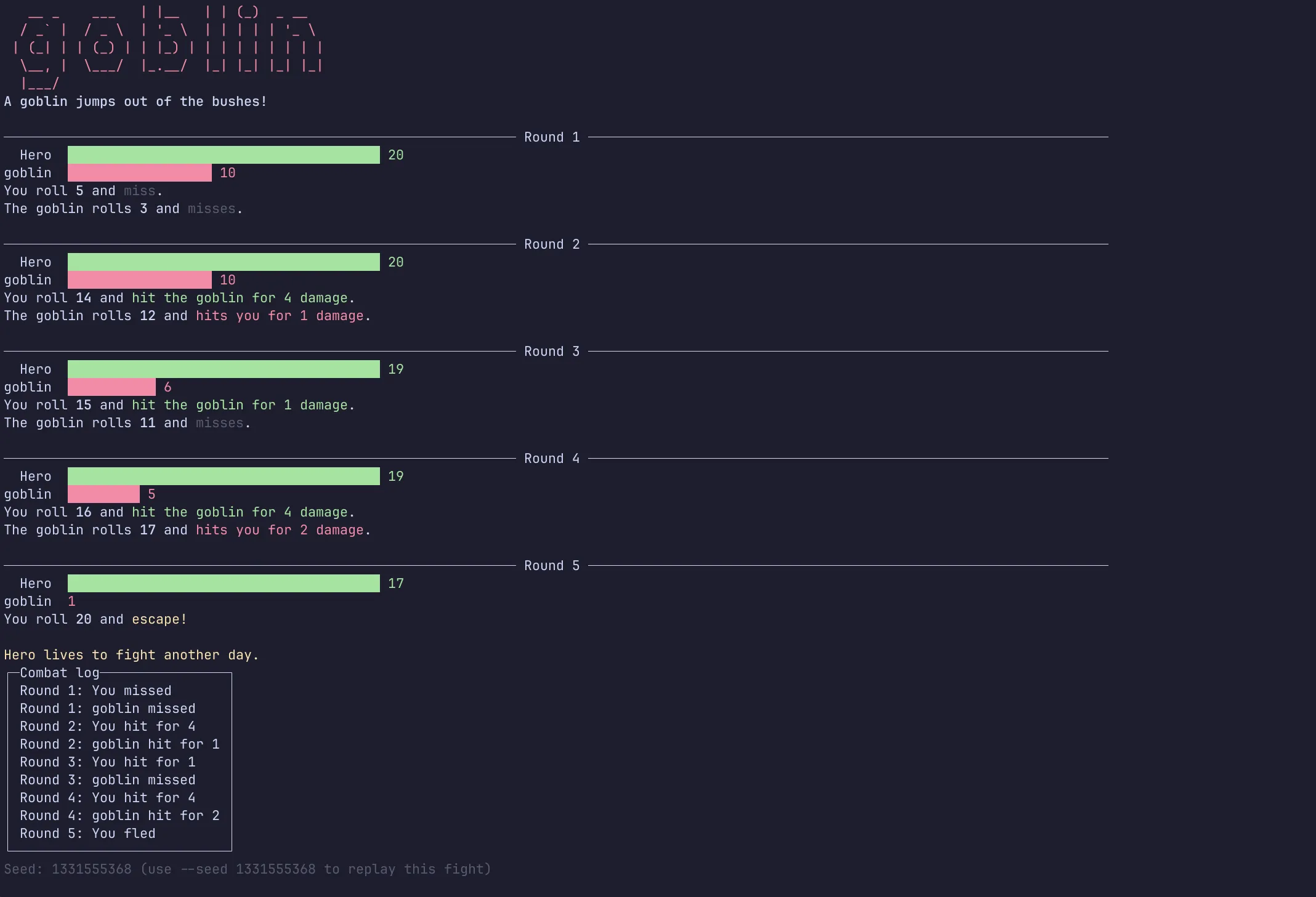
Each round, an arrow-key menu asks “What do you do?” and disappears once we pick. And yes, I ran from a goblin with 1 HP left.
Compared to Level 4, this is what we got without writing it:
-?,-hand--help, plus--version--hero=Ariaworks, not just--hero Aria- Specific errors:
Required argument missing for option: '--hero'.,Cannot parse argument 'abc' for option '--seed' as expected type 'System.Nullable`1[System.Int32]'.,Unrecognized command or argument '--bogus'. - Exit code 1 for every one of those
Code at this point: level-5
Gotchas
- The missing
--. The first time I implemented help in a console app, I scratched my head for quite some time before I realized I was missing the--before-h.dotnet run -hshowsdotnet run’s help, not ours. Usedotnet run -- -h(see Level 4). - Hand-written text has typos. Help text we write by hand, and input the player has to type, are where typos live. Let the library generate the help from our options, and give the player a selector instead of a text prompt. Both are easier and safer (see Level 5).
Recap
Five levels, one goblin fight:
- Level 1:
dotnet new consolecreates a project:Program.cswith top-level statements, a small.csproj, andobj/andbin/that stay out of git.dotnet runbuilds and runs it. - Level 2:
Console.Write,Console.ReadLineand string interpolation.ReadLinereturnsstring?, and nullable reference types make us handle thenull. - Level 3:
Random, awhileloop, a local function,booland aList<string>. Plusintdivision, which turns half of 1 into 0. - Level 4:
args, hand-parsed options,int.TryParse, exit codes, and whydotnet runneeds--before the app’s arguments. - Level 5:
dotnet add packageand two NuGet packages. System.CommandLine handles the options, errors and help. Spectre.Console handles the colors, bars and menus.
We’re not level 1 anymore. Next up: creating and debugging the same app in an IDE, with breakpoints, in a follow-up article.
Code: GitHub repo